Build vs buy AI for HR: what it takes to run in production
Build vs buy AI for HR comes down to the work: jurisdiction rules, leave, pay equity, and upkeep. See what building takes and how to test it in a POC.
Your IT team builds an AI assistant that answers employee questions about leave, benefits, and company policies. The demo goes well. Everyone is impressed.
So why pay for a separate AI tool for HR?
It's a fair question. But answering 'How many vacation days do I get?' is a different job from handling a leave request when the employee has already used part of their entitlement, or a promotion that would open a pay gap with peers.
These are the situations where a promising AI demo can fall short.
They're what make the build vs. buy AI for HR decision more complicated than it first appears.
The numbers bear that out: MIT’s NANDA initiative found that AI tools bought from specialized vendors or built with external partners succeed about 67% of the time, while internal builds succeed one-third as often, according to Fortune’s coverage.
Below, we look at what it takes to build artificial intelligence that can handle real HR work, what you're responsible for maintaining, and how to decide whether building or buying makes more sense.
What would it take to get HR-quality outcomes from a general-purpose platform?
Consider an employee who asks, "How much parental leave do I have left?"
A general-purpose AI model connected to your handbook could explain the company's parental leave policy, but to give that employee an accurate, personalized answer, the system would also need to:
- Identify the employee's circumstances: Where do they work? How long have they been employed? Which leave policies apply to them?
- Check their records: How much leave have they already used? Do they have any remaining entitlements?
- Apply the relevant rules: How do company policies interact with applicable federal, state, or local requirements?
- Know when to escalate: Is this a straightforward balance inquiry, or does it involve an exception that HR needs to review?
Handling all of this requires more than a model connected to your handbook. That's the difference between a chatbot and an AI HR agent, which checks employee records, applies company policy, and acts across HR systems.
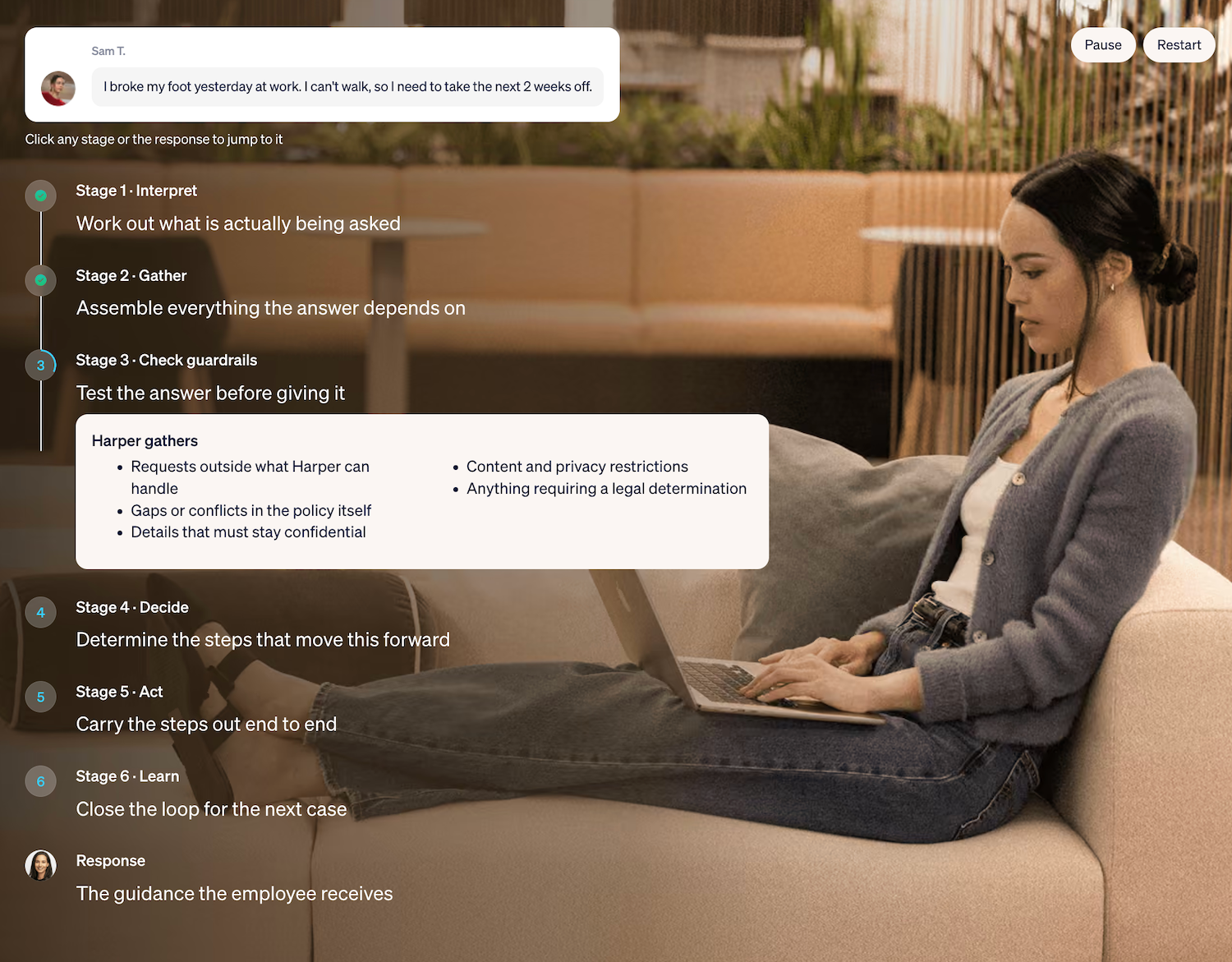
For example, Harper, Wisq’s AI HR teammate, can check an employee's history and relevant policies before answering a question or referring it to HR. The image below shows how Harper handles a workplace injury request, including checking for policy conflicts and situations that require human review.
Of course, you could build some capabilities around a general-purpose model yourself. But the work adds up, especially when you're developing several AI solutions for different HR processes.
The work that doesn't come out of the box
Capable AI models still need an HR layer. Most HR requests turn on two things a general-purpose model doesn’t have: the employee’s own record, and the policies and local laws that apply to them.
Which policy applies to which employee, in which jurisdiction
Two employees ask the same question about parental leave. One works in California, the other in Texas.
Their entitlements could differ based on location, employment history, and leave already taken.
A general-purpose AI model might explain the company-wide policy correctly but miss the rules that apply to each employee.
To avoid that, your team needs to connect employee records with the right company policies and applicable federal, state, and local requirements. This requires customization for your organization's policies and locations, plus regular updates when those rules change.
A performance conversation that becomes a leave or accommodation issue
A manager asks how to document an employee's repeated absences. Halfway through the conversation, they mention that the employee has a medical condition. That changes what HR needs to consider.
The situation may involve the Family and Medical Leave Act (FMLA) or an accommodation under the Americans with Disabilities Act (ADA), including the interactive process described by the EEOC.
If the AI continues recommending corrective action without recognizing that change, it could steer the manager toward the wrong next step. This is why employee relations workflows need to account for sensitive issues that may require a different response or human review.
The employee's history matters, too. Under the FMLA, eligible employees generally receive up to 12 workweeks of leave during the applicable 12-month period. Previous FMLA leave taken during that period counts toward the entitlement, according to the U.S. Department of Labor.
Even a short request like "I broke my foot at work and need the next two weeks off" depends on leave and case history, federal and state entitlements, PTO balances, and whether the injury is work-related.
A promotion that raises a pay equity question
A promotion request looks like a simple transaction: a new title, a new salary, an effective date.
Before anyone approves it, HR operations needs to check whether the proposed salary falls within the approved pay band, how it compares with colleagues in similar roles, and whether the justification meets the promotion policy.
Say a manager wants to promote someone with a 20% raise. The increase sounds reasonable until you discover it would put the employee above three colleagues already doing the same job.
A general-purpose model connected to your human resources information system (HRIS) could update the employee's salary exactly as requested. However, unless you've built in those compensation and compliance checks, it may never flag the potential pay equity issue.
That's why the real work happens before the job change reaches the HRIS, including checking the numbers, identifying exceptions, and getting the right approvals. In short, exercising real HR judgment, and not just saying “Yes” to requests.
How your team handled similar cases before
Employee history and case precedent live across the HRIS, ticketing, email threads, and past conversations. When your team approved a similar exception last year, that decision may be relevant to how a new request is handled. A general model starts each conversation cold.
This is especially challenging when relevant details are buried in proprietary data spread across different systems, including records containing sensitive data that employees shouldn't be able to access freely.
Without memory of the employee and of past cases, a system can't stay consistent. Consistency is a large part of what makes an HR decision defensible.
What building it yourself involves
Building it yourself means your internal team designs the reasoning, writes the guardrails, tests the edge cases, and keeps all of it current as policies and regulations change. That happens one use case at a time, so leave, promotions, and corrective action become three separate agentic workflows to build.
Your AI strategy also needs to account for who will maintain these workflows after launch, not just who can build the first version.
Accuracy and consistency
A successful demo shows that AI can answer a question correctly. Production requires it to handle similar requests consistently, including the complicated ones.
That means testing it against real HR scenarios, such as:
- An employee asking about leave without meeting the eligibility requirements.
- A manager requesting confidential salary information about another employee.
- An employee asking for details about an ongoing investigation.
Your team needs to define what the AI can answer, what information it can access, and when it should stop and involve HR. That also means AI training and testing should use realistic HR scenarios.
Those tests need to be repeated whenever the model, instructions, or underlying policies change.
Escalation rules
Someone has to decide which cases the system resolves on its own, which go to a person, and which person. A visa letter can run end to end. A harassment complaint goes straight to employee relations (ER).
Then there are requests that aren't so straightforward, like a salary exception, an accommodation request, or a manager asking how to issue a final warning.
Your team needs to decide which requests AI can handle, which require approval, and who receives each escalation. This hybrid approach allows AI to handle routine work while HR professionals review cases that need human judgment.
The handoff also needs to include enough context that HR doesn't have to start investigating the same request from scratch.
Model drift
Your AI might answer a leave question correctly today and respond differently after a model update.
That's because model providers regularly release new versions, and those changes can affect how your system follows instructions or handles unusual requests.
To catch problems, your team needs to rerun previously tested HR scenarios whenever the model changes.
If an update causes the AI to miss an escalation or give inconsistent guidance, someone needs to catch and fix it before employees are affected.
Compliance and liability questions
Before an internal build reaches employees, HR, IT, and legal should be able to answer a few questions together:
- Who reviews outputs on sensitive topics, and how often?
- What does the audit trail capture for each answer and action, and how long is it kept?
- Who's accountable when an answer is wrong, and how does the employee receive the correction?
- What employee data can the system see, and who approved that access?
Who maintains it over time
Internal builds tend to depend on a few engineers who understand both the code and the HR logic. Depending on the system, that could include data scientists, machine learning (ML) engineers, and people responsible for integrations and security.
When they move on, the system often stalls while employees keep using it. Someone has to own policy updates, new use cases, and fixes as a standing job, with the budget to match.
This becomes especially important as AI adoption grows and more employees start relying on the system.
Visibility and reporting
HR leaders need full visibility into everything an AI system does and how it reaches each decision: every inquiry, case, and workflow, and what was done in each, when, and why.
Most internal builds launch without that reporting, so errors, results, and confusing policies stay hidden.
For HR teams, this visibility also helps identify which requests take the most time and where employees regularly get stuck.
Where horizontal tools fit
Copilot, ChatGPT, and Claude are capable, and many companies already license one company-wide. They're well-suited to drafting, summarizing, and simple questions. Copilot can remain the front door for employees.
The problem is that these tools don't automatically know which HR policies apply to an employee, how similar cases were handled, or when a request needs human review. That's the gap an AI HR teammate fills.
Take Wisq's AI HR teammate, Harper, for example. When an employee submits a leave request, she can:
- Check their records: Look up their leave history, tenure, and relevant employee information.
- Find the right policies: Check company rules alongside applicable federal and state requirements.
- Flag potential issues: Identify policy conflicts, missing details, or cases that need HR review.
- Take the next step: Help resolve the request in the relevant system or send it to the right HR person with the relevant context.
Harper handles these steps using Wisq's HR Reasoning Engine, which combines HR-specific AI models, policy safeguards, case history, and the ability to work across HR systems.
That's one practical application of agentic AI in AI in HR: handling a request across multiple steps rather than simply generating an answer.
For IT, there's no need to replace your existing systems. Harper integrates with systems you already run, including Workday, ServiceNow, Slack, and Microsoft Teams, while respecting existing access permissions.
Wisq also manages model updates and testing, so your engineers don't have to maintain that HR-specific logic themselves.
Total cost of ownership
Total cost of ownership (TCO) supports this decision, and most of it is labor. Five cost categories show up in nearly every internal build:
- Design: HR experts and engineers mapping policies, workflows, and escalation rules.
- Testing: evaluation sets, edge cases, and regression runs after every model change.
- Maintenance: policy and regulation updates, integration fixes, and model upgrades.
- Governance: review of sensitive outputs, audit logging, access controls, and legal review.
- A second use case: the next workflow repeats much of the first one's design and testing.
You'll also need to account for AI investments in infrastructure, ongoing support, and any additional APIs required to connect your systems. Also, as you add more workflows, scalability becomes another consideration. None of these stop at launch.
When you compare options, ask AI vendors which of these categories they absorb.
How to run a proof of concept that shows which option works
A proof of concept (POC) should settle the build vs buy question with evidence from your own environment. Run it on your most important workflow, use your data and integrations, and score every option against criteria you set before it starts. That includes your internal build and your human capital management (HCM) system's AI add-on.
Three things make a POC effective:
- Test the messy cases. Include the leave request that turns out to be work-related, the promotion above band, and the question from an employee in another country. Clean demo cases prove little.
- Check the audit trail. For each case, confirm you can see what was decided, why, which policy it relied on, and what action followed.
- Review the escalations. Confirm each handoff reached the right person with full context.
Wisq runs POCs on these terms: on a prospect's most important workflow, head-to-head against any alternative, scored against the prospect's own criteria. It starts with an Autopilot analysis of your HR tickets and emails, so the test reflects how your team works.
Start with your most important workflow
Waiting has its own cost. Every quarter spent on an internal build or an HCM vendor's roadmap delays the savings and better employee experience you were after. Instead, start with one high-value workflow and prove it works. That might be leave requests, employee relations, or even a process connected to talent acquisition.
Autopilot reads your historical HR tickets and emails, finds the workflows that give your team the most time back, and builds them for your team to review and approve. Autopilot’s analysis takes one to three days, and most customers are live within 30 days from kickoff.
A practical first step: list the five HR requests that take your team the most time each month, and mark which ones depend on jurisdiction, employee history, or a judgment call. That's where to point your POC.
Getting HR-quality outcomes from a general-purpose platform takes reasoning, guardrails, case memory, and upkeep. Harper, Wisq's AI HR teammate, brings all four and works alongside the tools you already use. Book a demo to see Harper run your most important workflow or ask us to run a POC on your most important workflow against any alternative you’re considering.