What is an AI HR teammate? How it works and what it does
What is an AI HR teammate? Learn how AI HR teammate support employees and managers, scale HR service delivery, and work alongside human HR teams.


More HR software vendors are calling their artificial intelligence products "AI teammates," but the term can mean anything from a chatbot that answers policy questions to an AI system that handles entire HR cases.
For HR leaders managing stretched HR operations, the real question is: How much work can an AI teammate actually take off your team's plate?
According to SHRM's 2025 State of the Workplace report, 62% of HR professionals said their departments operated beyond typical capacity in 2024. That capacity goes to leave intake, policy questions, case documentation, and chasing the information needed to close a request. An AI teammate will help reduce that workload, not simply give HR another tool to manage.
This guide defines an AI HR teammate, walks one leave case through every stage, and covers what a teammate can be trusted with, how fast one goes live, and the areas where people stay in charge.
What is an AI HR teammate?
An AI HR teammate is an AI system that handles HR requests from start to finish, much like an experienced HR professional. It understands what an employee needs, checks the relevant policies and records, completes tasks across HR systems, and involves a person when a decision requires human judgment.
An AI HR teammate can help with:
- Routine HR questions: Answering employee-specific questions about benefits, PTO balances, payroll, and company policies to improve the employee experience.
- Multi-step requests: Handling leave, onboarding, and job changes, including gathering information, coordinating approvals, and updating records to automate repetitive tasks.
- Sensitive HR cases: Collecting details, checking policies, and preparing documentation for employee relations or corrective action cases, while leaving final decisions to HR. That may include issues arising during performance management.
For example, when an employee requests medical leave, Harper, Wisq's AI HR teammate, can check their eligibility and previous leave usage, ask for missing information, and prepare the case for HR if approval is needed. Employees can reach her through Slack, Microsoft Teams, or email without having to track down the right HR contact.
What makes an AI HR teammate a teammate?
Unlike an AI assistant or a chatbot that answers a question and stops, AI HR agents can follow requests through to resolution.
Four traits separate a teammate from software that answers and stops:
- Compliance awareness. It knows what it can say, what it can't, and which rules change by jurisdiction.
- Memory of past cases. Employee history and earlier conversations carry forward, so nobody starts from scratch.
- Action across systems. It reads and writes across your Human Resources Information System (HRIS), ticketing system, and other systems of record.
- Learning from every case. Decisions, escalations, and outcomes build up alongside employee feedback, so it handles similar cases better over time.
These traits are central to agentic AI in HR, where AI can take action rather than simply provide information.
How an AI HR teammate handles a real case
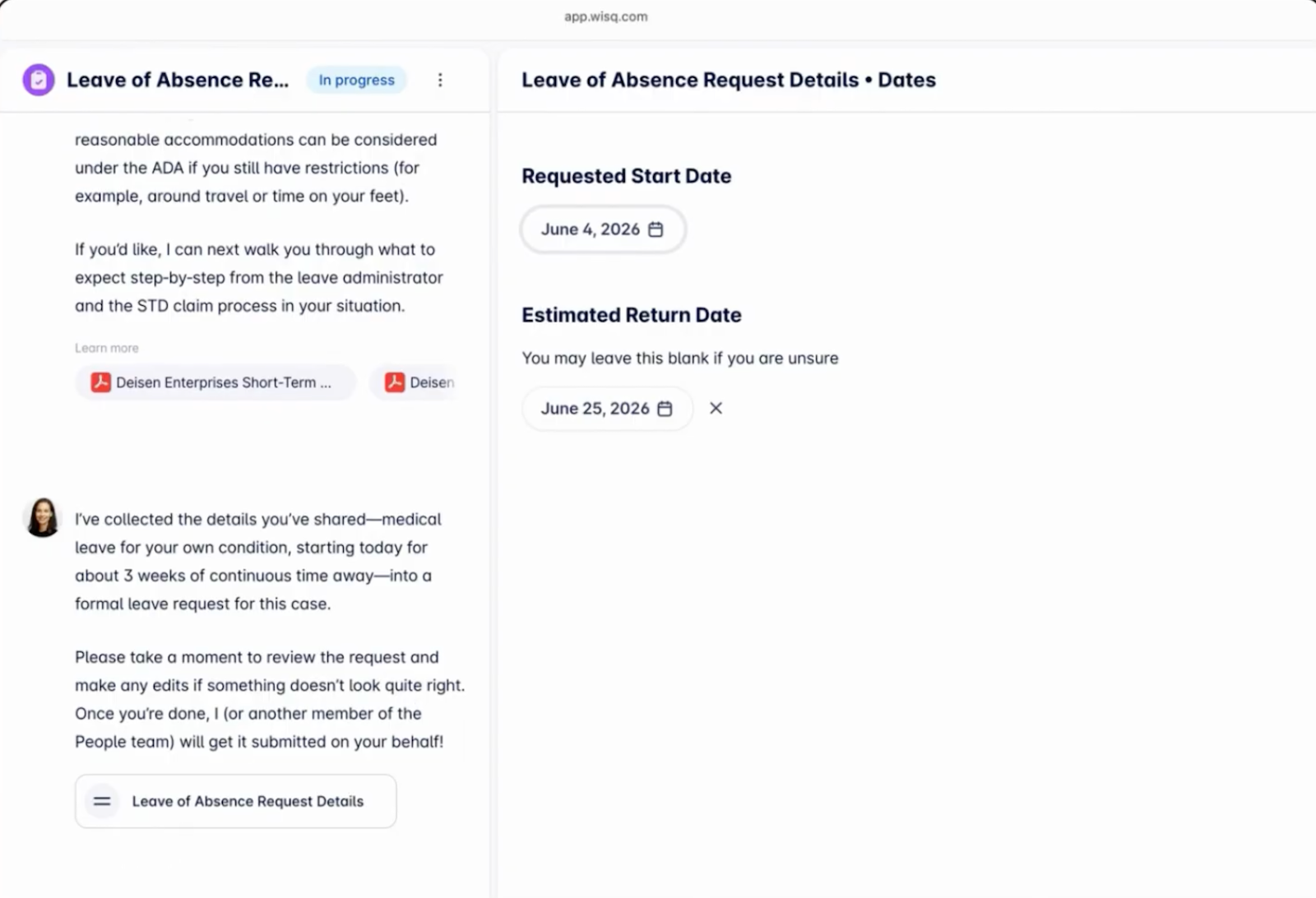
An employee messages Harper: "I broke my foot yesterday at work. I can't walk, so I need to take the next two weeks off."
It sounds like a straightforward leave request, but several things need checking before HR can determine the right process. Was the injury reported at work? Is the employee eligible for protected leave? Have they used any leave already?
At Wisq, we built Harper to approach this like an HR professional. When a request comes in, she works out the intent, then builds a plan to resolve it. Here are the six stages, as shown in the leave simulation on the HR Reasoning Engine page.
Interpret the request
Harper recognizes that the employee needs medical leave, but the fact that the injury happened at work matters. It may involve workers' compensation as well as other leave benefits.
Rather than immediately directing the employee to a leave form, she identifies what needs to be checked and what additional information is required.
Gather policy and employee context
Next, Harper gathers the information needed to handle the request:
- Employee details: Work location, employment type, tenure, and hours worked.
- Leave history: Previous leave taken, remaining PTO balance, and past cases.
- Applicable policies: Company leave policies and federal and state entitlements.
- Previous conversations: Any information the employee has already shared about their situation.
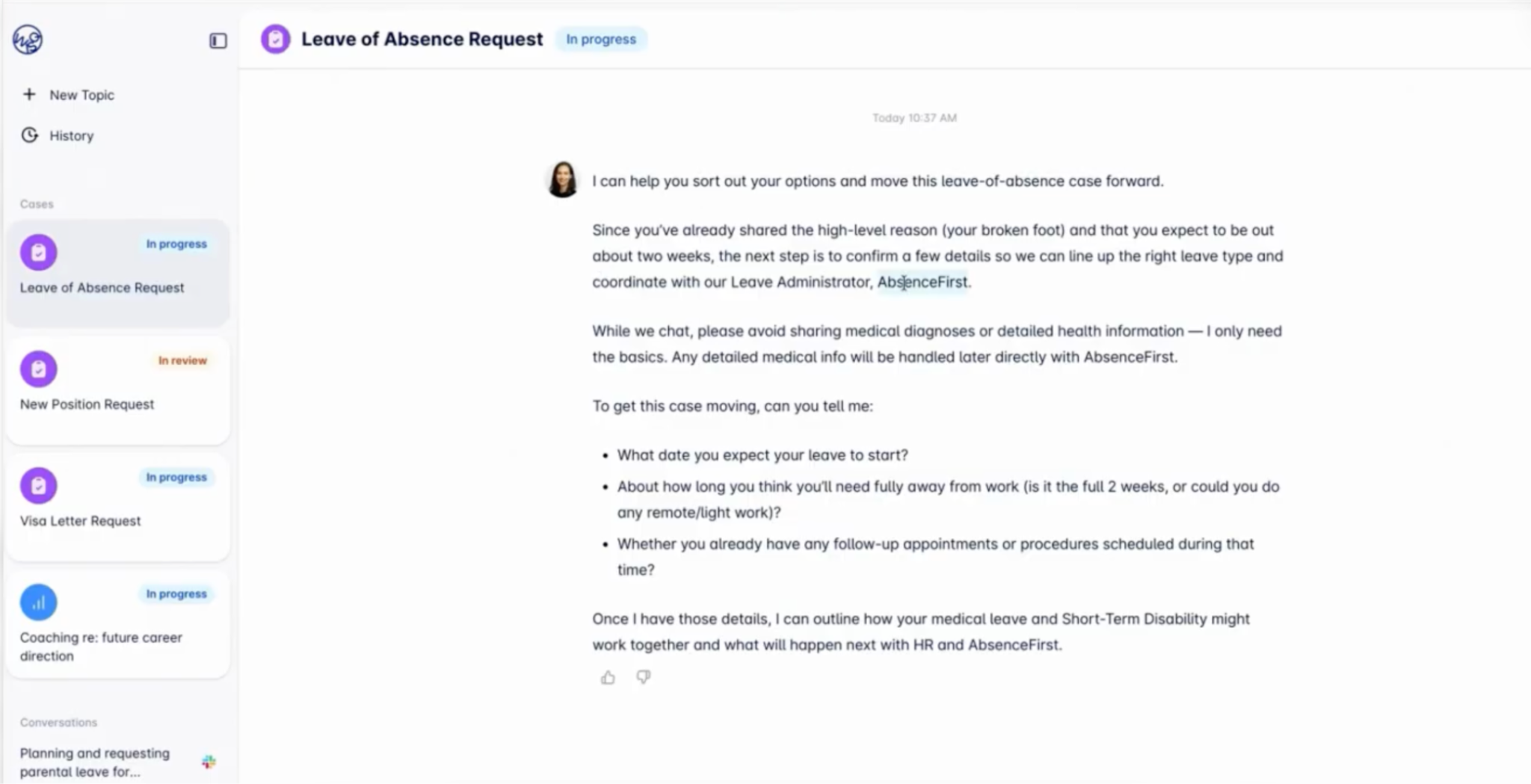
Prior leave matters here. Under the Family and Medical Leave Act (FMLA), how much protected leave remains depends on what the employee already used in the employer's 12-month period, as the U.S. Department of Labor explains.
Check guardrails
Before proceeding, Harper checks what she can handle and what requires HR involvement.
For instance, the employee may need to share medical documentation with a leave administrator, but their manager shouldn't receive unnecessary medical details. If company policies conflict or the situation involves privacy requirements such as GDPR or requires a legal determination, Harper flags it for the appropriate person rather than making the decision herself.
Decide
With the relevant information gathered, Harper determines the appropriate next steps. She might ask the employee for missing dates, prepare a leave request, or route the case to HR for review. If the employee has insufficient FMLA leave remaining, she flags the shortfall so HR can consider other applicable leave or accommodation options.
Act
Harper carries out the plan. She records the facts in the case, files with the leave carrier or administrator, notifies the manager only what they need to know, updates the system of record, tells the employee what happens next, and queues later actions, like documentation deadlines.
Learn from every case
Finally, she closes the loop. If Harper had to hand off part of a case because she lacked the knowledge, she says so and asks for it, so she can handle that question herself next time. She also flags policy gaps for HR, patterns repeating across cases, and systems she still needs access to. This helps with change management as policies and workflows evolve. Over time, the team spends less effort on the same questions.
What an AI HR teammate can be trusted with
Some HR requests are straightforward. Others involve sensitive employee information, changing regulations, and decisions that can affect someone's employment. Handling these cases requires more than a general-purpose language model. It takes an understanding of HR policies, employee history, and when to involve a person.
That's why Wisq combines HR-specific language models with policy checks, case memory, and an audit trail in its HR Reasoning Engine.
Here's how Wisq’s Harper puts that into practice:
- Leave: Checks previous leave usage, eligibility, state entitlements, and company policies before preparing requests and coordinating with leave administrators. HR steps in when eligibility or other decisions require human judgment.
- Employee relations: Collects information about reported incidents, asks follow-up questions, and prepares case documentation. HR reviews the facts, investigates where necessary, and makes the final decisions.
- Corrective actions: Guides managers through documenting attendance or performance issues, checks previous incidents against company policies, and prepares corrective action records for HR review. HR retains authority over disciplinary decisions.
How fast can an AI HR teammate go live?
Most customers are live within 6–12 weeks from kickoff, configured on their own HR history. Autopilot reads your historical HR tickets, emails, and policies, maps how your team actually resolves cases, and ranks workflows by the time they'll give back. It builds the first versions, and your team reviews, edits, and approves each one. Nothing ships without your sign-off.
Wisq will also run a proof of concept against any alternative, on your most important workflow, scored against your own criteria.
After go-live, a dedicated Wisq team of an Agent Strategist and Agent Engineers monitors performance, expands workflows, and keeps Harper improving.
Results build as Harper learns. For distributed teams, timely answers can also support employee engagement and retention. At Breeze Airways, she resolves 91% of HR inquiries without a human handoff across 2,800+ team members, and nearly half of those inquiries arrive outside business hours.
Where people stay in the loop
An AI HR teammate resolves routine cases end to end and sends high-risk or ambiguous ones to the right person with full context. People keep the judgment, empathy, and accountability that sensitive work requires.
Can AI HR teammates replace humans?
No. Investigations, disciplinary decisions, accommodations, and sensitive employee relations cases still require human judgment.
An AI HR teammate handles the volume around those moments, like policy questions, intake, routing, and documentation. When a case surfaces legal exposure or protected activity, she escalates it to HR with everything they need.
How HR roles change
HR work is already shifting. AI already supports recruiting and talent acquisition, including resume screening, but an HR teammate focuses on employee cases that continue after hiring.
Requests arrive across more channels and time zones. Policies vary more by location. Employees expect fast, consistent service. Knowledge sits scattered across handbooks, shared drives, and inboxes. An AI HR teammate absorbs that load, so HR professionals spend more time coaching managers, handling sensitive cases, and building programs.
Their role also expands to include deciding which work the teammate takes on and reviewing her performance, a shift Wisq explores as it rebuilds HR for the AI age.
From software people operate to a teammate that finishes the work
Traditional HR software helps teams store information, manage tickets, and move requests through workflows. But someone still has to check the details, follow up with employees, and make sure each case gets resolved. An AI HR teammate can take on much of that work, while involving HR when a decision requires human judgment.
A useful first step is to pick the case type that ate the most HR time last quarter, often leave or corrective action, and map every handoff it required. Those handoffs show where a teammate would take on the work.
Harper is built to make that shift practical, with the HR Reasoning Engine behind every decision and Autopilot to find where to start. Book a demo to watch Harper, Wisq's AI HR teammate, work a leave request from intake to resolution.
FAQs about AI HR teammates
1. What does an AI HR teammate do?
An AI HR teammate answers employee questions, checks policies and employee records, and handles multi-step requests such as leave, onboarding, and job changes. It can also prepare sensitive cases for HR review. For more examples, see these AI use cases in HR.
2. Can an AI HR teammate replace HR?
No. AI HR teammates handle routine questions, administrative tasks, and case preparation, while HR professionals remain responsible for sensitive decisions involving discipline, investigations, accommodations, and legal matters.
3. What can an AI HR teammate be trusted with?
With appropriate safeguards, an AI HR teammate can handle routine requests and support more complex work such as leave administration, employee relations intake, and corrective action documentation. It should check relevant policies, protect employee information, maintain an audit trail, and escalate cases requiring human judgment. These are also important considerations when evaluating AI agents for HR.
4. How long does it take an AI HR teammate to go live?
Harper goes live in 6 weeks. Autopilot analyzes your HR tickets, emails, and policies, builds initial workflows, and hands them to your team for approval before anything ships. A dedicated Wisq team then keeps expanding and improving her workflows after launch.