Wisq vs Workday: how Harper works alongside your HCM
Wisq vs Workday: Workday stays your system of record. See what Workday Sana does, where Harper handles HR judgment work, and what to ask before you decide.

A manager wants to promote an employee. Before anything gets updated in Workday, someone in human resources (HR) needs to check the employee's eligibility, review the proposed salary, document evidence of why the employee is ready, confirm it follows company policy, and gather the necessary approvals.
By the time the promotion reaches Workday, the hard work has already happened.
That's the difference between Workday and Wisq's Harper.
Workday remains your system of record, storing employee information and managing HR transactions. Harper does the judgment work that comes before and around those transactions.
She reasons through policy, location-specific rules, and employee history the way an experienced HR partner would, and she takes on cases where a wrong answer can be costly: leave, corrective action, and pay decisions—while always bringing a human in when needed.
With Workday offering its own AI agents through Sana, the real questions are, what role does Harper play in your HR ecosystem, and what can she do that Workday can't?
Below, we compare them side by side and show where Harper takes on work that Workday leaves to your team.
Workday and Harper at a glance
Workday and Harper sit at different layers of the HR stack, and they’re designed to run together.
What Workday Sana does
Workday Sana is Workday's AI assistant and AI platform for employees to find information, complete tasks, and manage workflows without navigating multiple menus or systems.
Workday launched it to customers on March 17, 2026, with four core capabilities:
- Find information: Answer questions using company knowledge and Workday data, with sources.
- Complete tasks: Update employee information and complete tasks across connected systems.
- Create reports: Build dashboards, summaries, and documents from company data.
- Automate workflows: Set up multi-step processes without writing code.
The Sana Self-Service Agent offers employee self-service skills across pay, time and attendance, and absence, while following Workday's existing security, permissions, and audit controls. Sana and the Self-Service Agent are available through Workday Flex Credits. Sana Enterprise, available with Workday HCM or Financial Management, connects to additional tools.
At Workday Rising on October 13, 2026, Workday made Sana the new Workday Home and introduced Sana Concierge. This HR and IT agent handles requests involving leave, onboarding, and payroll by applying policies and coordinating approvals. Cases requiring human judgment still go to specialists.
What Harper does
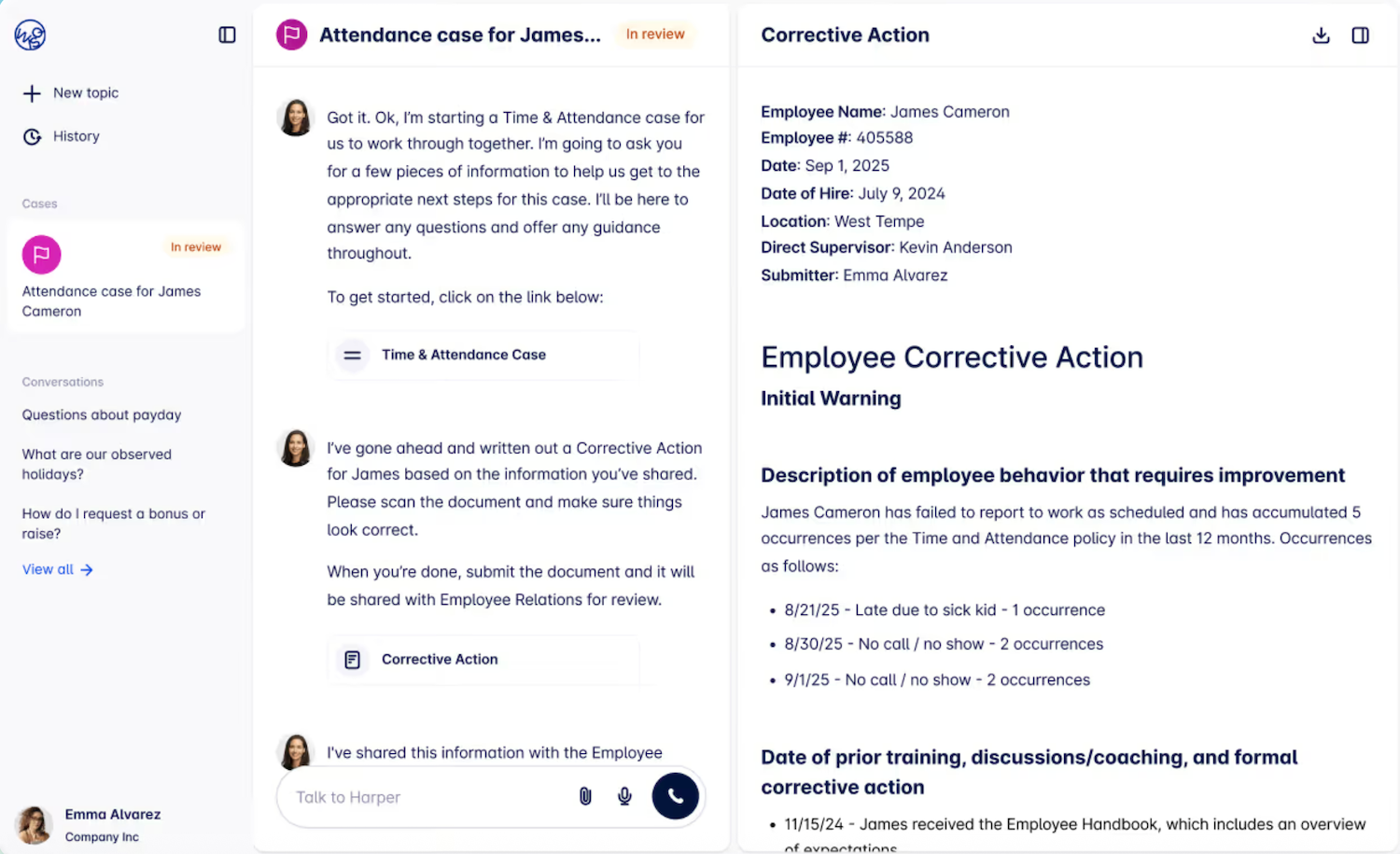
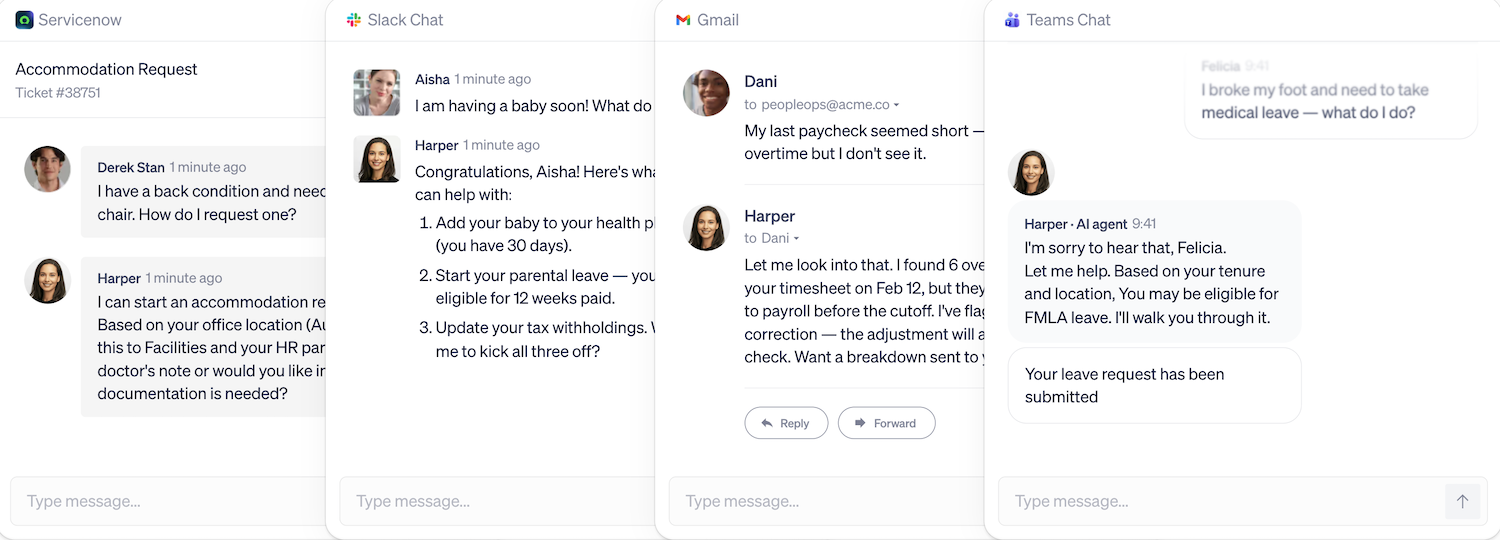
Harper is an AI HR teammate that helps employees and managers handle HR requests from start to finish. She works through tools they already use, including Microsoft Teams, Slack, email, and shared HR inboxes.
But Harper doesn't only answer questions. She can check policies, chase missing details, coach managers through decisions, and bring in HR when a call needs a person.
Before the transaction
A promotion might end with just a few updates in Workday: a new title, salary, and effective date. But getting there takes much more work. Someone needs to confirm the employee's eligibility, check the proposed salary against the pay band and colleagues in similar roles, review the manager's justification, and collect approvals. The process may also differ depending on where the employee works.
Harper helps managers through these steps. She can:
- Check employee details: Pull tenure, compensation bands, and performance history.
- Spot missing information: Ask for more details and evidence when a promotion justification isn't clear.
- Prepare the request: Gather the information and supporting documents HR needs to review.
- Move things forward: Route the request for approval and, once approved, initiate the relevant process in Workday.
These checks are an important part of talent management, especially when promotions involve important compensation decisions.
Without Harper, HR business partners handle much of this HR operations work, spending time answering managers' questions, chasing missing details, and guiding them through approvals.
As Alex Macaulay, Senior Account Executive at Wisq, explains:
Around the transaction
Some HR work never becomes a single transaction. A performance concern turns into a leave question. An employee follows up on a case from last quarter. A manager needs help documenting corrective action consistently with how similar cases went before.
Harper keeps long-term case memory, so employee history and prior context carry forward across conversations. She learns from how past cases were handled and hands cases that need judgment to the right person with full context attached. Each step is logged, so HR can see what Harper did and why.
How they work together
Harper operates within Workday and your other core systems, reading from them and writing to them. Workday continues to store employee records and manage transactions throughout the employee lifecycle, while Harper helps with the requests, questions, and approvals surrounding those transactions.
Wisq’s Harper also connects with other tools in your HR stack, including:
- HR service management: ServiceNow, Jira, Workday Help, and Zendesk.
- Communication: Slack, Microsoft Teams, and email.
- Identity and access: Okta and Microsoft Entra ID, alongside your existing SSO setup.
- Knowledge management: SharePoint, Confluence, and Google Drive.
These connections let Harper work across your existing HR software instead of requiring employees to use another system for every request.
At FICO, for example, Harper integrates directly with Workday and Microsoft Teams, so managers prepare performance management reviews with each employee's goals in front of them.
In one review cycle, 154 managers used Harper to prepare reviews for 567 direct reports, giving Harper high marks in terms of the guidance she provided with an average NPS score of 69. Workday remained the source of employee information, while Harper helped managers prepare for their conversations.
Wisq also handles autonomous setup of workflows. Autopilot reads your historical HR tickets and emails, finds the workflows that take your team the most time, and builds them for your team to review and approve. Most customers are live in about 30 days, and Wisq will run a proof of concept on your most important workflow, scored against your criteria.
What Harper does that Workday can't
Both Workday and Wisq build agentic workflows that act on HR requests, and both describe bringing in people when judgment is needed. The differences come down to focus, reach, and maturity.
- Built for HR judgment. Sana works across HR, finance, and IT. Harper is built only for HR. Wisq's HR Reasoning Engine checks company policy, employee history, and federal, state, and city rules before she acts. That's why customers trust her with leave, employee relations, and corrective action, where a wrong answer becomes a legal problem.
- Works across HCMs. Harper connects to Workday as well as UKG, SAP SuccessFactors, ADP, and Dayforce, and she works inside shared HR inboxes, where much HR work still arrives. The choice of AI HR teammate doesn't depend on which HCM you run.
- In production today. Harper resolves cases for customers now. For example, at Breeze Airways, she resolves 91% of the HR inquiries she receives without needing a human handoff across more than 2,800 team members. Concierge, Workday’s HR service agent, is with early adopter customers now, with general availability expected in the first quarter of 2027.
- A dedicated team after launch. An Agent Strategist and Agent Engineers from Wisq monitor Harper's performance, expand workflows, absorb model updates, and run regression testing, so the deployment keeps improving.
Where each fits
Workday and Harper each have a clear job. The deciding factor is the kind of question in front of you.
When the question is about a record
Workday is the right home for questions answered by the record itself: a pay stub, a time-off balance, an address change, a direct report's job history. Sana makes those faster to find and act on. Harper reads the same record and can answer these questions, too, but the record and the transaction stay in Workday.
When the question needs HR judgment
Harper fits when the answer depends on more than the record. That includes policy that differs by location, employee history that changes the process, and cases that should go to a person. A leave request is a good test.
Whether the employee has used leave before, where they work, and whether the injury happened at work all change what HR should do next. Harper gathers those facts, applies the policy, and escalates when a decision belongs with HR. That multi-step reasoning is what distinguishes capable AI HR agents from basic self-service.
Questions to ask before you decide
HR leaders and the HRIS or HR IT team who own the HR technology stack should answer these together:
- Which HR requests take your team the most time today? Pull the last quarter of tickets and emails and rank them by volume and effort.
- How much of that work happens before a Workday transaction exists? Count the back-and-forth on promotions, job changes, and leave before anything is entered.
- Which cases depend on jurisdiction or employee history? These are the cases where an agent's reasoning matters most.
- Does every HR system you rely on run on Workday? If leave goes through a third-party administrator or cases live in ServiceNow, test how each option handles the handoff.
- What's available now, and what's on a roadmap? Score each option on capabilities you can test in your environment today.
- Who maintains the agent after launch? Ask who updates policies, tunes escalations, and catches drift.
- Can you see it work on your own data before you sign? Ask each vendor to run your highest-volume workflow in a POC, scored against your criteria.
How Harper and Workday resolve HR cases together
Workday is built to record what happened: the title, the salary, the effective date, the audit trail. But deciding what should happen is different work.
You have to check the policy against that employee’s record, decide whether the manager’s reasoning is strong enough, and often help the manager make a better case.
That responsibility falls on your team, and that’s what Harper takes on: the judgment around every HR request, across every system your team uses.
Book a demo to see her run a promotion or leave request in your own Workday environment, or ask about a proof of concept on your most time-consuming workflow.