The Human Element
AI In HR: Adoption, Best Practices, and What Comes Next
AI is reshaping HR operations. Discover the use cases, implementation steps, and guardrails HR teams need to adopt AI responsibly and drive real value.


AI is no longer an experiment or the future for HR. It's already here and shaping how work gets done.
From answering everyday employee questions to supporting managers through complex performance conversations, AI is becoming embedded in the operational core of many HR teams. So the challenge now isn't whether to use AI, but how to use it in ways that are practical, responsible, and deliver real value for HR teams and their broader organizations.
AI in HR is often discussed in vague or technical terms: vendors promising transformation or headlines focusing on disruption. Meanwhile, HR teams on the ground have to find pathways through very real constraints, like limited headcount, ever-growing compliance complexity, fragmented systems, and rising expectations from employees and company leaders. AI can help — but only if it's applied to the right problems, with the right guardrails, and with the clear understanding that human judgment must remain in the loop.
This guide provides a roadmap to adopting AI for HR professionals looking for a plan. We'll break down why AI is transforming HR so rapidly; concrete use cases across recruiting, performance management, compliance, and HR service delivery; and practical guidance on implementation, governance, and risk.
But most importantly, this isn't about replacing the humans at HR's core. Implementing AI in HR means redesigning HR operations so people teams spend less time answering the same questions, cleaning up data, or chasing tedious workflows — and more time on work that requires judgment, empathy, and strategic insight.
What Is AI?
In HR, AI is a set of capabilities that help systems recognize patterns, generate responses, and take action within defined guardrails.
AI most often shows up in HR when software can answer employee questions using policy documentation, flag potential compliance risks, summarize meetings or performance feedback, recommend next steps in a workflow based on historical data, and similar tasks.
To understand AI in HR, it helps to separate AI itself from how HR teams use it. Most HR teams don't need an in-depth understanding of model architectures or LLM training techniques. What matters in the field is that AI can increasingly support people decisions, reduce manual effort, and improve consistency without introducing unacceptable risk. Viewed through that lens, AI in HR goes beyond just automation. It's becoming a tool for operational leverage.
Josh Bersin has written extensively about AI in HR, and frames the shift clearly: "Crossing a Rubicon means 'passing a point of no return.' Well that’s where we are. Despite inflammatory stories about AI ruining our lives and careers, Gen AI is a useful, pragmatic, easy to understand tool. It’s by no means perfect, but once you learn how to use it (and build a trusted data set to train it), it works quite well."
What Are the Types of AI In HR?
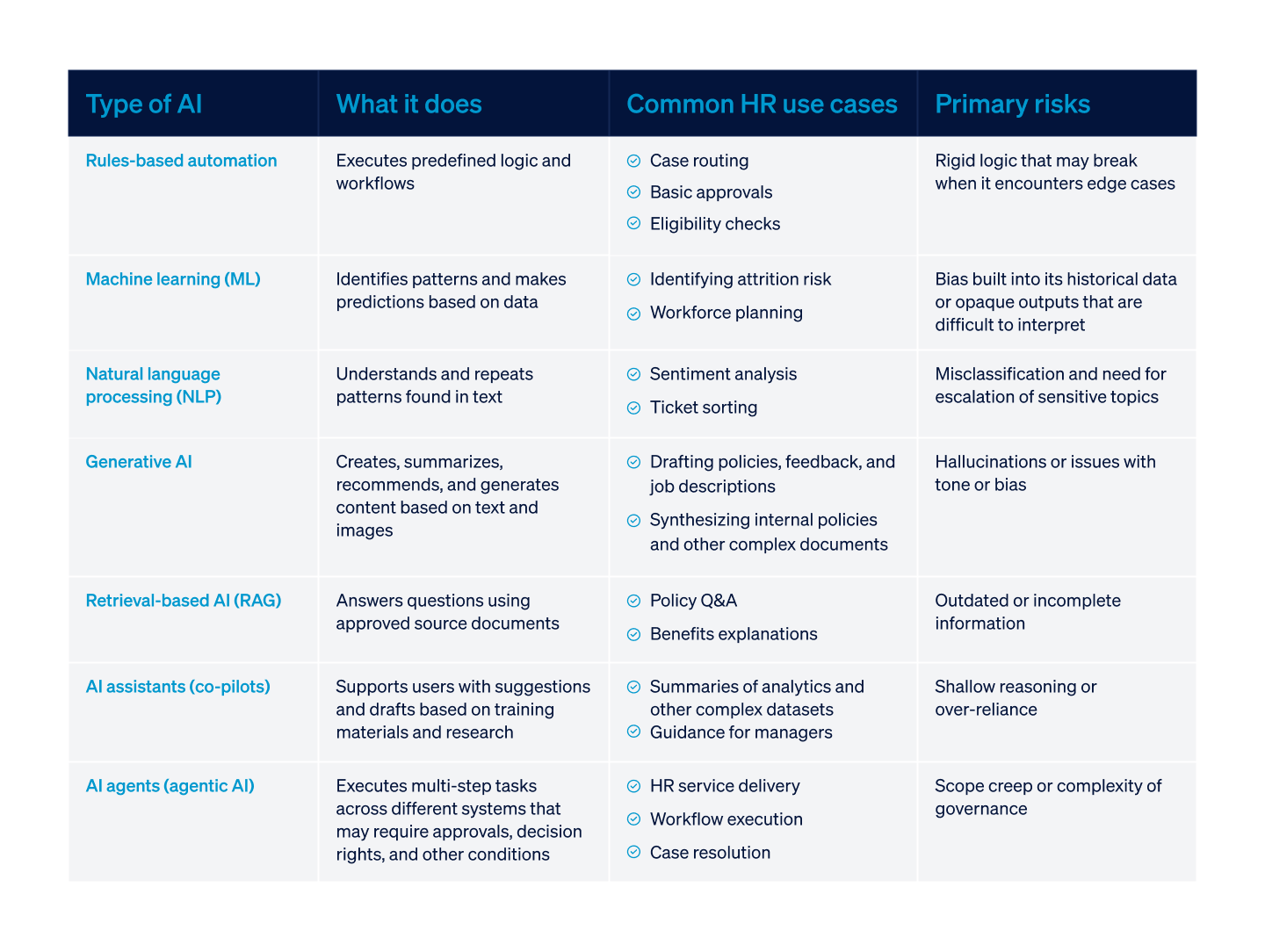
In HR, the most common types of AI are rules-based automation, machine learning (ML), natural language processing (NLP), generative AI, retrieval-based AI (RAG), AI assistants (co-pilots), and AI agents.
HR tools are no longer just systems of record; they're increasingly systems of action, insight, and support. But different HR problems call for different types of AI. Treating AI as a single category means you'll misapply it.
For HR leaders, one of the biggest challenges is choosing the right AI tool for the job they need done. For example, applying generative AI where you need deterministic rules (or vice versa) creates risk without actually adding value.
Why Is AI Transforming HR Operations?
AI is transforming HR operations because the traditional HR operating model struggles to keep up with modern demands. HR teams are being asked to support larger, more distributed workforces, navigate increasing regulatory complexity, and deliver faster, more consistent service — often with flat (or even shrinking) headcount. The only way the math works is if they can increase their output capacity without a proportional increase in HR employees, and AI makes that possible.
More and more, adoption data reflects this. 43% of HR professionals reported using AI in 2025, up from 26% the year before. The acceleration isn't driven by novelty; it's driven by necessity as HR work becomes more operationally dense and expectations for accuracy, responsiveness, and employee experience continue to rise.
There's already a widening gap between leadership and employee expectations and what people teams can realistically deliver — one that AI for HR processes is increasingly expected to close.
What Are the Benefits of AI for HR
When implemented thoughtfully, AI delivers value in HR through increased capacity, speed, consistency, and compliance, as well as better decision support and improved employee experience.
These are some of the strongest benefits it offers today:
1. Increased Capacity and Speed
AI reduces the volume of manual, repeatable work that consumes HR time. There's huge potential here; Rippling's 2025 State of HR report showed that 90% of HR leaders spend over a quarter of their time on administrative work that AI could potentially absorb, freeing them up to focus on higher-value tasks.
This shows up in metrics like:
- Faster case resolution
- Higher first-contact resolution rates
- Less time spent answering the same policy questions
2. Greater Consistency and Compliance
By grounding its responses in approved policies and standardized workflows, AI helps reduce variation in how rules are interpreted and applied from case to case. This is particularly valuable in HR, where situations can be compliance-sensitive and inconsistency can create risk for the organization. Measurable signals in this area include:
- Fewer escalations
- Clearer audit trails
- Fewer policy-related errors
3. Better Decision Support
AI can't replace human judgment. But it can improve the inputs that HR judgment relies on. AI's pattern detection, summarization, and forecasting abilities all help HR teams surface risks earlier and make decisions with better context. This means:
- More accurate workforce planning
- More targeted interventions
- Cleaner analytics and reporting
4. Improved Employee Experience
Finally, from employees' perspectives, AI offers faster answers to questions (at all hours of the day or night), fewer handoffs, and less back-and-forth communication when resolving a ticket or issue. HR teams can track and measure experience metrics through:
- Support CSAT
- Reduced time-to-answer
- Follow-up rates on HR tickets and queries
How To Use AI In HR?
The HR teams seeing real value from AI do more than just pick up tools — they start by diagnosing operational friction, then deliberately match the right AI approach to the right workflow before ever even thinking about rollouts or scaling.
While broad adoption may be your eventual goal, it's better to start small. Think about targeted leverage and apply AI first where it can meaningfully reduce HR's load, improve its consistency, strengthen its decision-making, or reduce its risk.
This framework can help teams get started implementing AI for the first time, before moving on to wider tool rollouts.
Step 1: Understand the Problems AI Can Solve
Before evaluating vendors or features, HR teams should inventory where time, accuracy, or consistency regularly break down — prime areas for AI to make improvements. If your function experiences any of these common HR problems, they may be good candidates for AI support:
- Overloaded HR service delivery: Repetitive employee questions, manual triage, and inconsistent responses create bottlenecks and frustration for both HR teams and employees
- Documentation and policy inconsistencies: Policies live across PDFs, company intranet, shared drives, and email threads, so your team struggles to keep answers consistent at scale
- Reactive decision-making: HR is often pulled into conversations late (for example, after performance issues escalate, attrition spikes, or compliance risk surfaces), because signals are buried deep in data or spread across disconnected systems
- High-volume manual work: Reporting, data cleanup, handoffs between systems or departments, and status updates consume your team's time so you have none left for strategic, value-adding work
Step 2: Find the Right Place for AI In Your Workflow
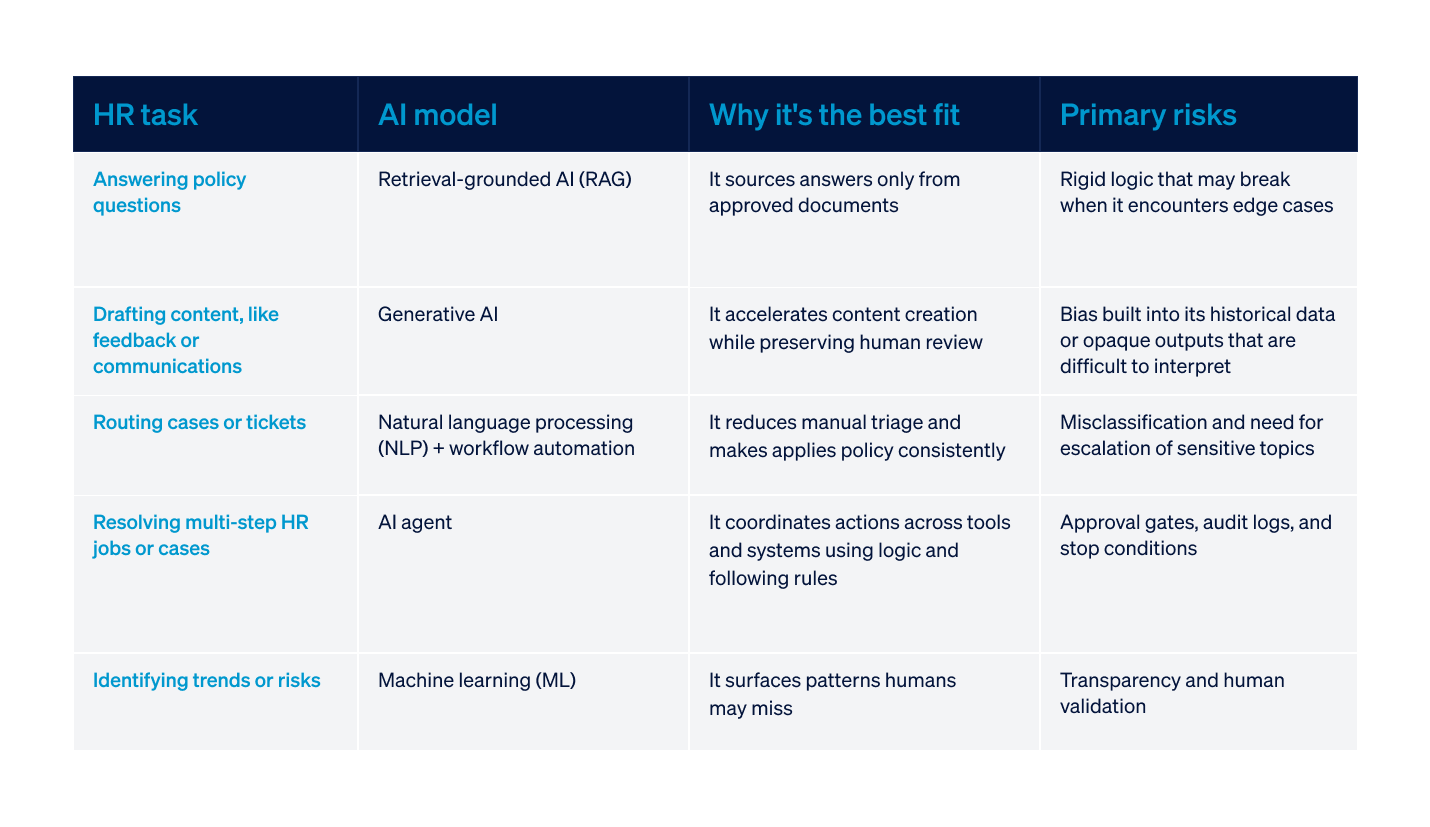
AI models are not interchangeable, so the next step is matching the right AI to the workflow where your HR team identified they could use the support. Part of this step is also determining where to use AI versus where to keep humans in the workflow. The more judgment, risk, or consequence is involved in the task, the stronger the human oversight must be.
Here's how some common HR tasks match up with common AI models — and, more importantly, what human guardrails are required to keep them safe and secure.
Step 3: Roll It Out With Planning, Training, and Buy-In
When AI initiatives fail, it's not always because of the technology; it's often because of change management gaps. A successful rollout needs to treat AI as an operational change, not just a feature launch.
Follow these steps in your launch plan to increase your odds of success:
- Get early, cross-functional alignment: Legal, IT, and leadership should be involved before you start a pilot, not after issues surface.
- Start with a defined pilot project: Limit scope, define success metrics, and choose a workflow where impact is measurable (for example, time-to-resolution or case deflection).
- Establish clear guardrails: Document what AI can and cannot do in your organization. Be clear about when humans must intervene and how exceptions are handled.
- Monitor continuously: Accuracy, bias, drift, and user feedback need to be reviewed regularly, not just at launch or during the pilot.
Step 4: Upskill Your Team
In 2026, AI literacy is a core competency, not a niche skill. Upskilling doesn't mean you have to turn HR professionals into data scientists, but organizations who don't give their employees the context to use AI confidently and responsibly are now doing them a huge disservice.
This area is especially in need of investment; only 8% of HR leaders believe their managers have the right skills to use AI effectively. Organizations who prioritize upskilling will be better positioned as AI continues to evolve. But more importantly, they'll build more trust — with their employees and their leaders.
Some of the key skill areas to consider prioritizing include:
- AI judgment and boundaries: Understanding what AI is good at, where it fails, and when escalation to a human is required
- Bias and risk awareness: Recognizing how and when bias appears in outputs and how to spot warning signs as early as possible
- Data and source hygiene: Knowing which data sources are approved, current, and appropriate to use to train AI models
- Measurement and accountability: Tracking whether AI is actually improving employee, department, and business outcomes
What Are Common Use Cases for AI In HR?
AI's use cases in HR are wide ranging, and include recruiting and talent acquisition, employee onboarding and offboarding, performance management, analytics, workforce planning, compliance, and more.
Last year, The Hackett Group surveyed HR departments and found that 66% of them were leveraging generative AI in some capacity:
- 52% to write job descriptions
- 48% to draft employee communication
- 45% to answer HR-related queries
- 39% for resume screening
- 29% for skills documentation and training assessments
The use cases listed below reflect where real HR teams are already applying AI to improve their productivity and efficiency.
1. Recruiting and Talent Acquisition
Recruiting was one of the first HR domains to adopt AI because it combines high volume with repeatable structures. But it's also an area that handles a lot of sensitive, personal employee information, which means guardrails are a must. The strongest AI use cases here focus on throughput, coordination, and insight, not automated decision-making.
AI doesn't succeed in recruiting and talent acquisition by "hiring faster;" it removes friction from the process, creating better candidate experiences and allowing recruiters to spend more time evaluating candidates and building relationships.
How AI is commonly used:
- Parsing resumes and structuring candidate data for review
- Communicating with candidates at scale (status updates, interview logistics, rejection messages)
- Coordinating interview schedules across multiple stakeholders
- Analyzing funnel metrics to identify bottlenecks or drop-off points
These applications reduce administrative load on recruiters and HR professionals and improve time-to-hire without interfering with human judgment.
Where AI should not operate independently:
- Evaluating candidates
- Scoring interviews
- Making offer decisions
These are the decisions that require contextual judgment and accountability that only a human can provide.
Necessary guardrails:
- Bias testing
- Screening criteria reviews
- Clear documentation of how AI outputs are used
- Mandatory human reviews of candidates, especially shortlists
2. Employee Onboarding and Offboarding
Onboarding and offboarding are ideal AI use cases because they rely on coordination and timely execution of tasks between systems.
AI helps with onboarding and offboarding by making it more consistent and reliable at scale — not necessarily faster. This improvement directly impacts employee experience and trust, and can ripple outward to the organization's compliance posture, too.
How AI is commonly used:
- Coordinating onboarding and offboarding workflows across HR, IT, payroll, device management, and other functions
- Answering new hire questions using approved policy and benefits documentation
- Tracking task completion and surfacing gaps as they arise
Here, AI can help make sure nothing falls through the cracks, especially in organizations with distributed or fast-growing workforces.
Where AI should not operate independently:
- Sensitive employee conversations
- Handling exceptions (for example, for non-standard roles or exits)
- Employee relations issues
Necessary guardrails:
- Clear workflows with owners and predictable logic
- Escalation paths for unresolved or sensitive questions
- Auditability for access and approvals
3. Performance Management and Analytics
AI can improve performance management in key ways — reducing administrative drag and improving signal quality — with the key caveat that it must not replace human evaluation. Used correctly, it can help shift performance management from documentation-heavy to coaching-centered, making the entire process more valuable for employees.
How AI is commonly used:
- Drafting performance review summaries
- Synthesizing feedback into themes
- Identifying performance trends across teams or roles
- Summarizing engagement or goal-tracking data for managers and leadership
AI should support managers during review cycles by helping prepare inputs and synthesize and interpret data — not deliver verdicts.
Where AI should not operate independently:
- Deciding performance ratings
- Making compensation decisions
- Taking employment actions
These outcomes require context, intent, and accountability that only a human can provide.
Necessary guardrails:
- Mandatory human review of any feedback language that's AI-generated
- Bias-aware prompting with review steps
- Clear internal guidance on acceptable use
4. Employee Engagement and Retention
Engagement challenges are tough. They're rarely caused by a single signal, but that's precisely why AI can be so useful in this area: It can synthesize patterns humans struggle to see at scale, giving you earlier insights.
How AI is commonly used:
- Analyzing open-text survey responses
- Identifying recurring themes across engagement signals
- Highlighting participation trends or shifts over time
- Supporting managers with conversation prompts or follow-up guidance
In these ways, AI helps HR teams move from reactive to proactive engagement strategies.
Where AI should not operate independently:
- Monitoring employees on an individual level
- Predictive labeling of employees
- Any use that feels like surveillance
Necessary guardrails:
- Aggregation thresholds that protect privacy
- Transparency about data use
- Human interpretation before data is used
5. Talent Management, Learning and Development, and Training
When it comes to talent management and L&D, AI is great at personalization and discovery, but it still shouldn't be used for making autonomous career decisions; humans still need to be in the loop whenever growth decisions are made. As HR teams are increasingly expected to support continuous skill development at scale, AI helps by making sense of complex skill data and learning signals that would otherwise be difficult to operationalize.
How AI is commonly used:
- Mapping skills across roles and teams
- Identifying skills gaps based on role requirements
- Recommending courses and other learning content aligned to development goals
- Analyzing training participation, completion trends, and other metrics
These capabilities help HR move beyond one-size-fits-all training and offer personalized L&D opportunities.
Where AI should not operate independently:
- Deciding promotions, terminations, or anything else related to career paths
- Choosing succession outcomes
These decisions depend on aspiration, performance, and dialogue and are best left to the human employees and their managers.
Necessary guardrails:
- Regular review and validation of skills frameworks
- Manager involvement in all development and progression discussions
- Oversight to make sure recommendations don’t reinforce existing inequities
6. Workforce Planning
Workforce planning benefits from AI's ability to synthesize data and model scenarios, but it's important to keep in mind that forecasts are only inputs, not answers. HR leaders face increasing pressure to anticipate talent needs (especially amid increasing economic uncertainty), and AI helps by making planning more dynamic and data-informed.
How AI is commonly used:
- Headcount forecasting based on historical hiring, attrition, and growth patterns
- Attrition risk modeling based on patterns associated with turnover
- Estimating which skills will be in higher demand based on business strategy, market shifts, or technology
- Modeling "what if" scenarios, such as expansion, consolidation, or automation
Where AI should not operate independently:
- Making financial decisions or trade-offs
- Changing organization design. Structure reflects strategy, culture, and leadership priorities, not just data
- Making strategic workforce decisions
Necessary guardrails:
- Human validation for all outputs before decisions are made
- Regular recalibration as business conditions change
7. HR Compliance
Compliance can be one of the highest-value AI use cases, when the technology is grounded in approved sources and has escalation built in. HR teams field constant questions about policies, benefits, and regulations that need consistent, accurate answers, which AI can provide to reduce overall organizational risk.
How AI is commonly used:
- Providing consistent answers to common questions using approved documentation
- Standardizing responses across regions or teams
- Supporting case documentation and audits by organizing records, summarizing cases, and making sure required steps are documented
- Flagging potential compliance risks for review by recognizing patterns or anomalies
Where AI should not operate independently:
- Interpreting ambiguous legal situations
- Replacing legal counsel
- Enforcing disciplinary actions
Necessary guardrails:
- Retrieval-based answers tied to current, approved policies
- Visible citations so HR can trace outputs back to sources
- Clear escalation paths for unclear or high-risk questions
8. HR Chatbots, Assistants, and Agents
Confusion between chatbots, assistants, and agents is one of the most common sources of friction when businesses implement AI tools. While these tools are often grouped together and used interchangeably, they serve fundamentally different purposes:
- HR chatbots: Handle FAQs and simple, repeatable interactions. Useful for deflecting basic questions, but limited in scope
- HR assistants: Support HR users and managers when writing drafts, creating summaries, analyzing data and surfacing insights. Can provide guidance, augmenting human work rather than executing it
- AI agents: Go a step further by coordinating and executing multi-step workflows, resolving cases, and taking action across multiple systems under defined rules
Agents add distinct value to HR teams that chatbots and assistants can't. They:
- Manage end-to-end HR service delivery
- Coordinate complex actions across HRIS, knowledge base, and case management systems
- Escalate sensitive issues to humans at the right moment
Wisq's AI HR agent, Harper, supports HR operations at scale while keeping the most important, value-adding decisions with people. She helps shift from answering questions to closing the loop on HR work, which is what sets agents apart from simpler tools.
How To Implement AI In HR?
Implementing AI in HR is more than a single decision; it's a sequence of operational choices that compound over time. The HR teams that get this right focus on three things: readiness, then fit, then measurement.
This playbook follows that order, so AI adoption strengthens your HR function instead of creating new complexity.
Build Vs. Buy: Deciding How AI Should Enter Your Tech Stack
Most HR teams should not be building AI from scratch. Building requires mature data infrastructure, dedicated technical ownership, and ongoing governance that most HR functions (and most businesses in general) are simply not resourced to maintain. That means that for most teams, the decision comes down to: extend their existing tools or buy new HR software with AI built in?
Here's a practical roadmap to follow:
Extend your existing AI tools when:
- AI supports low-risk work, such as drafting communications, summarizing documents, or synthesizing internal notes
Buy new, AI-enabled HR software when:
- AI is expected to touch employee data, coordinate workflows, or support compliance-sensitive processes. Purpose-built tools have permissions, accountability, and escalations already built in
Build custom AI software when:
- AI is a core differentiator for your business and you have clear ownership for model oversight, security, and compliance
Data Readiness: What Must Be True Before Launching AI In HR
AI can't fix messy inputs. Before deploying AI into HR workflows, you need a baseline level of data hygiene and governance. At a minimum, HR teams planning to implement AI need to confirm:
- Policy hygiene: Core policies are current, version-controlled, and written clearly enough to be interpreted correctly and consistently.
- Knowledge governance: There is a single, defined source of truth for employee guidance, with specific owners responsible for updates.
- Permissions and access controls: Data access aligns with role-based permissions, especially for any sensitive data or employee information.
- Clear escalation paths: AI outputs that fall outside defined confidence thresholds will always be routed to humans for review and intervention.
Vendor Evaluation Checklist: What To Look For In AI HR Software
AI features alone aren't enough. When evaluating vendors, you need to zoom out and consider how AI is operationalized inside real HR workflows.
Key questions to ask during evaluation include:
- Is AI embedded in workflows, or does it live in a separate interface?
Look for: Software that puts AI where it can support work where it already happens.
- How does the system handle human oversight?
Look for: Approval gates, escalation logic, and visibility into when and how the AI hands work back to people.
- Are outputs grounded in approved sources?
Look for: Traceable answers, especially for policy and compliance use cases.
- Is activity auditable?
Look for: Logs that show what the AI did, when and how it acted, and why.
- How does the platform manage security and compliance?
Look for: Role-based access, customizable data retention, and security reviews.
What To Measure From Day One
If AI isn't measured, you won't know whether it's helping or hurting HR (by creating new complexity or additional risk). Start measuring it immediately at launch, not after it scales.
Common metrics HR teams can track include:
- Case deflection rate: How many routine questions are resolved by AI without HR intervention
- Time to resolution: Whether employee issues are closed faster than before
- First-contact resolution: How often issues are resolved without a follow-up
- Escalation accuracy: Whether AI routes the correct cases to humans for review or intervention
- Employee satisfaction: CSAT or pulse feedback showing employee sentiment about HR support
Minimum Viable Governance for HR AI
Is your team ready to implement AI for HR? Before going live, every HR team should be able to answer "yes" to the following:
- AI has clearly defined boundaries for what it can and cannot do.
- Humans retain decision rights for high-risk outcomes.
- Source documents are owned, current, and auditable.
- Escalation paths have been documented and tested.
- Someone is accountable for monitoring the AI on an ongoing basis.
What Are the Challenges and Considerations For AI in Human Resources?
While AI is a powerful tool, it comes with some challenges, like ethical concerns, bias, and hallucinations.
AI risk isn't a reason to pause adoption, but it does mean it's necessary to design controls deliberately. The same capabilities that make AI powerful for HR — speed, pattern recognition, autonomous execution, etc. — also introduce operational and compliance exposure that can't be entirely eliminated (but can be managed).
Here are some of the core challenge areas HR leaders need to address when implementing and scaling AI.
Hallucinations
While any type of AI can hallucinate (or produce false or misleading outputs), generative AI is particularly known for hallucinations that appear polished and authoritative, even when they're incorrect. In HR, that's more than inconvenient; it can create compliance risks, employee confusion, inconsistent policy application, and costly business vulnerabilities.
It's important for policy-related answers to be grounded in approved documents; retrieval-based systems should surface the source document behind every answer. And if a question falls outside defined confidence thresholds (or touches sensitive topics like termination or accommodation), it should route to a human automatically.
Ethical Concerns and Bias
AI reflects the data and systems it's trained on. In HR, that means bias can appear — in screening, performance language, development recommendations, attrition modeling, and more.
Mitigating bias takes more than just disclaimers; HR professionals need to be proactive about reviewing the data they use to train their AI tools to remove as much bias as possible, testing outputs for disparate impact, and monitoring AI performance for patterns that could indicate bias is slipping through unseen. It's also crucial to require human sign-off on high-stakes decisions like compensation and employment.
Data Privacy and Security
HR data is among the most sensitive inside an organization. AI systems interacting with that data must meet the same (or higher) standards as HRIS platforms:
- PII minimization: AI should only access the data necessary to perform its defined function.
- Role-based access controls: Permissions should mirror existing HR access policies.
- Retention and logging policies: AI interactions should be auditable and traceable.
- Vendor transparency: Vendors should be able to articulate their security posture clearly.
Regulations
AI in employment is increasingly subject to regulatory scrutiny. For example, New York City's Automated Employment Decision Tools (AEDT) law, which went into effect in 2023, requires bias audits when AI tools are used to screen candidates during hiring. This signals a broader trend toward transparency and accountability when AI tools touch hiring and recruitment; HR leaders should assume regulatory expectations will expand in the future, not contract.
Over-Reliance
One of the most subtle risks is cultural: What happens when teams start treating AI outputs as default truth?
While AI tools have made huge strides in quality and reliability, they still aren't infallible. To prevent over-reliance, HR teams should continue investing in upskilling and AI literacy training, as well as defining decision rights frameworks. For example:
- AI can make recommendations, but
- Humans make final decisions, and
- Named owners remain accountable for AI tools and their outputs
At the end of the day, AI is a tool. Accountability remains with people.
The Future of AI in HR: What Comes Next?
No one knows for sure what the future will bring, but as AI tools evolve, HR is likely moving toward a new, AI-enabled operating model. Organizations that adapt successfully will redesign how HR work flows, moving from reactive service delivery to orchestrated, AI-supported systems.
A number of shifts are already underway:
- Adoption to adaptation: Many organizations are experimenting with AI, but few are scaling it. The future belongs to HR teams that move beyond pilots and embed AI into their core workflows (securely and deliberately).
- HR Operations at the center: As AI becomes more embedded in HR, operational design becomes a strategic discipline. In other words, AI success in HR depends less on model sophistication and more on process architecture. This is especially emergent as AI systems mature beyond chatbots and RAG and agentic AI becomes the standard.
- Humans move up the value chain: As AI absorbs repeatable, rules-based, and documentation-heavy work, the human core of HR isn't shrinking, but it's shifting. HR professionals now have more time to coach managers, design workforce strategy, strengthen culture and trust, and other high-impact, high-value work.
AI's long-term opportunity in HR isn't just about efficiency. It's about redefining HR’s role from transactional support to strategic enablement, and that's the next generation of HR.
Frequently Asked Questions
1. How is AI used in recruitment processes?
AI is used in recruitment to support screening, coordination, communication, and analytics. It is not used to make final hiring decisions.
AI can:
- Parse resumes and structure candidate data for consistent review
- Draft job descriptions and outreach messages
- Schedule interviews across stakeholders
- Analyze funnel metrics to identify bottlenecks
Where teams get into trouble is allowing AI to influence candidate evaluation without clear guardrails. AI can support hiring workflows, but humans must retain decision rights.
2. How is HR AI used in performance reviews?
AI supports performance reviews by drafting, summarizing, and synthesizing feedback. It should never assign ratings or make employment decisions. Managers should also remain cognizant of the risks: if they rely too heavily on AI-generated language, performance conversations can become generic or biased. Clear guidance and mandatory human review prevent that drift.
3. Why is AI onboarding good for new hires?
AI improves onboarding by making it more consistent and responsive — not necessarily faster. It can:
- Coordinate multi-step onboarding workflows
- Answer benefits and policy questions at any hour
- Track task completion and flag gaps
- Standardize documentation across departments
Inconsistent onboarding is one of the fastest ways to erode new-hire confidence, so using AI to increase reliability can have a huge impact on candidate experience.
4. Why should companies adopt AI-enabled HR survey tools?
AI-enabled survey tools turn open-text feedback into usable insight faster and more consistently. Instead of manually reviewing hundreds of comments, AI can identify recurring themes, flag emerging concerns, and surface sentiment patterns over time.
This shortens the gap between listening and action. However, aggregated analysis is essential; AI should not be used for invasive individual-level monitoring.
5. How can AI help HR improve workforce planning?
AI improves workforce planning by modeling scenarios and surfacing patterns. It helps teams:
- Forecast headcount needs
- Identify attrition trends
- Analyze skill gaps
- Model "what-if" scenarios tied to growth or restructuring
AI increases visibility and speed, especially when leadership needs timely projections.
6. Is AI replacing humans in HR?
No. AI is absorbing repeatable operational work, not replacing HR judgment. HR work is changing, not disappearing. As AI absorbs manual work, HR professionals can move toward coaching, strategy, and high-risk decision areas.
7. What HR functions should not be handled by AI?
Any function involving final employment decisions, legal interpretation, or sensitive employee relations must remain human-led.
This includes (but is not limited to):
- Terminations
- Compensation decisions
- Formal disciplinary actions
- Accommodation determinations
- Legal interpretations
AI can provide information and summarize context. It should not determine outcomes. Here's a simple rule: If the decision materially affects someone’s employment status, a human must remain accountable.
8. How do you measure the ROI of AI in HR?
ROI in HR AI is measured through operational metrics, such as:
- Case deflection rate
- Time to resolution
- First-contact resolution
- Escalation accuracy
- Employee satisfaction with HR support
Track outcomes, not usage. Adoption metrics alone do not equal value.